
Posted By Rob Whalley
Implementing a CMMS or CAFM System: Key Resources and Stages for a Successful Rollout
Implementing a Computerised Maintenance Management System (CMMS) or Computer-Aided Facilities Management (CAFM) solution can significantly improve operational efficiency, compliance, and visibility. However, the success of such a project depends not only on the software itself but also on the clarity of process, collaboration, and commitment from both the client and supplier.
One of the most critical success factors is having a dedicated Project Manager on both the client and supplier side. Acting as central points of contact, these individuals are essential for coordinating internal communications, aligning priorities, maintaining momentum, and ensuring accountability throughout every stage of the project.
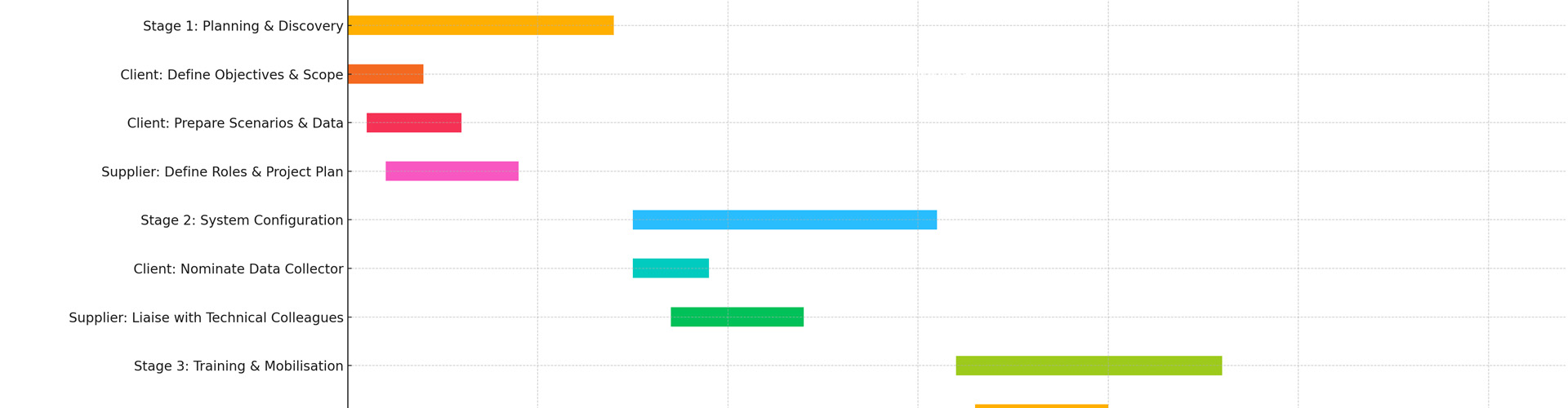
Below, we outline the key stages of implementation and the roles and resources required on both sides to ensure a smooth and successful rollout.
Stage 1: Discovery & Planning
Supplier Responsibilities:
- Nominated Project Manager: Appoint a supplier-side lead to manage scope, communications, and deliverables.
- Requirement gathering: Conduct discovery sessions to identify client needs, current workflows, and operational pain points.
- Solution mapping: Align system features and modules to the client's specific goals and processes.
- Project plan creation: Develop a detailed project timeline with clear milestones, dependencies, and deliverables.
Client Responsibilities:
- Nominated project manager: Assign a client-side lead to coordinate internal teams and act as the central contact.
- Stakeholder engagement: Involve representatives from all relevant departments (FM, IT, compliance, finance) from the outset.
- Goal setting: Define key objectives and what success looks like (e.g. improved compliance, reduced downtime).
- Scenario planning: Prepare sample data sets and real-world use cases to support requirements gathering and system configuration.
Internal preparation: Confirm IT requirements such as SSO and third-party integrations and ensure the necessary infrastructure and network access are in place to support the system.
Stage 2: System Configuration & Setup
Supplier Responsibilities:
- Technical build: Liaise with supplier-side technical colleagues during the build process to ensure proper integration and system readiness.
- System configuration: Configure modules, user roles, workflows, and automations based on agreed requirements.
- Data import: Cleanse, map, and import key data such as assets, locations, PPM schedules etc.
- User access & permissions: Set up role-based permissions, user hierarchies, and mobile access points.
Client Responsibilities:
- Nominate a data lead: Assign a dedicated data collector to gather, review, and validate all required information. This may involve liaising with external industry specialists if internal resources or knowledge are limited.
- Data provision: Collate and supply accurate and structured data, including asset registers, maintenance schedules, site geography, contractor lists etc as requested by the supplier.
- Feedback & sign-off: Review system configurations and respond promptly to feedback requests or queries.
Stage 3: Testing & Validation
Supplier Responsibilities:
- Functional testing: Validate that configurations and integrations work as intended across different scenarios.
- Scenario walkthroughs: Run real-world simulations to ensure workflows align with operational requirements.
- Issue resolution: Respond to bugs or issues identified during client testing in a timely manner.
Client Responsibilities:
- User testing: Assign team members to test key system functions and flag any inconsistencies or usability concerns.
- Validation: Ensure all imported data, configurations, and automated processes meet operational expectations.
- Go-live readiness: Provide final sign-off once the system is confirmed fit for purpose.
Stage 4: Training & Go-Live
Supplier Responsibilities:
- Training delivery: Run tailored training sessions, ideally using a ‘train the trainer’ approach to equip key client personnel to cascade knowledge internally.
- Support materials: Provide user guides, reference documentation, and training videos to support system adoption.
- Go-live support: Offer enhanced support during the initial launch period to assist with live operations and queries.
Client Responsibilities:
- Staff engagement: Ensure key staff attend training and have time allocated to support go-live activities.
- Change management: Clearly communicate the benefits of the new system to encourage user adoption and reduce resistance.
- Live deployment: Begin using the system for real-time operations and performance tracking.
Stage 5: Ongoing Support & Optimisation
Supplier Responsibilities:
- Helpdesk access: Provide ongoing technical and functional support through a structured support service.
- Ongoing reviews: Through regular account management and system reviews, recommend enhancements and process improvements based on client feedback.
- Product updates: Deliver system updates and communicate changes that may impact functionality or user experience.
Client Responsibilities:
- Performance monitoring: Track system usage, adoption rates, and operational impact.
- Feedback loop: Report any issues or enhancement requests via agreed support channels.
- Long-term engagement: Continue working with the supplier’s account team to refine and expand system usage over time.
Final Thoughts
Implementing a CMMS or CAFM system is a strategic investment that requires more than just technology—it needs strong leadership, proactive communication, and clearly defined responsibilities. With dedicated Project Managers on both sides, and a collaborative approach at every stage, organisations can ensure a smooth transition and maximise the value of their new system.
Thinking of implementing a CAFM system? Tabs FM offers a fully supported onboarding process, with a dedicated project team to guide you from scoping to success. Contact us today (sales@tabsfm.com) to start your digital transformation.

































Follow us:
GDPR (Data Privacy)
Disclaimer
COVID-19